
RAIL photo-z estimates for Rubin Data Preview 1 (DP1)#
In this tutorial, we will:
access a photo-z catalog derived from Rubin’s Data Preview 1 using LSDB (for data rights holders)
access the same catalog using pandas or any other Parquet reader (for all users)
reconstruct the
qp.Ensemblefrom the PDF nested columns
1. Loading through LSDB#
In order to access the catalog through LSDB, you must be a Rubin data rights holder, because the catalog includes sky coordinates and magnitudes from the original DP1 dataset. At present, there are two ways to access this data: RSP and CANFAR, described in Accessing Rubin Data Preview 1 (DP1).
[1]:
from upath import UPath
import lsdb

base_path = UPath("/rubin/lsdb_data")
dp1_pz_catalog = lsdb.open_catalog(base_path / "object_photoz")
dp1_pz_catalog
[1]:
| objectId | knn_z_median | knn_z_mean | knn_z_mode | knn_z_err95_low | knn_z_err95_high | knn_z_err68_low | knn_z_err68_high | tpz_z_median | tpz_z_mean | tpz_z_mode | tpz_z_err95_low | tpz_z_err95_high | tpz_z_err68_low | tpz_z_err68_high | cmnn_z_median | cmnn_z_mean | cmnn_z_mode | cmnn_z_err95_low | cmnn_z_err95_high | cmnn_z_err68_low | cmnn_z_err68_high | gpz_z_median | gpz_z_mean | gpz_z_mode | gpz_z_err95_low | gpz_z_err95_high | gpz_z_err68_low | gpz_z_err68_high | bpz_z_median | bpz_z_mean | bpz_z_mode | bpz_z_err95_low | bpz_z_err95_high | bpz_z_err68_low | bpz_z_err68_high | dnf_z_median | dnf_z_mean | dnf_z_mode | dnf_z_err95_low | dnf_z_err95_high | dnf_z_err68_low | dnf_z_err68_high | fzboost_z_median | fzboost_z_mean | fzboost_z_mode | fzboost_z_err95_low | fzboost_z_err95_high | fzboost_z_err68_low | fzboost_z_err68_high | lephare_z_median | lephare_z_mean | lephare_z_mode | lephare_z_err95_low | lephare_z_err95_high | lephare_z_err68_low | lephare_z_err68_high | bpz_ens_interp | cmnn_ens_norm | dnf_ens_interp | fzboost_ens_interp | knn_ens_mixmod | lephare_ens_interp | tpz_ens_interp | gpz_ens_norm | coord_ra | coord_dec | |
|---|---|---|---|---|---|---|---|---|---|---|---|---|---|---|---|---|---|---|---|---|---|---|---|---|---|---|---|---|---|---|---|---|---|---|---|---|---|---|---|---|---|---|---|---|---|---|---|---|---|---|---|---|---|---|---|---|---|---|---|---|---|---|---|---|---|---|---|
| npartitions=5 | |||||||||||||||||||||||||||||||||||||||||||||||||||||||||||||||||||
| Order: 3, Pixel: 2 | int64[pyarrow] | double[pyarrow] | double[pyarrow] | double[pyarrow] | double[pyarrow] | double[pyarrow] | double[pyarrow] | double[pyarrow] | double[pyarrow] | double[pyarrow] | double[pyarrow] | double[pyarrow] | double[pyarrow] | double[pyarrow] | double[pyarrow] | double[pyarrow] | double[pyarrow] | double[pyarrow] | double[pyarrow] | double[pyarrow] | double[pyarrow] | double[pyarrow] | double[pyarrow] | double[pyarrow] | double[pyarrow] | double[pyarrow] | double[pyarrow] | double[pyarrow] | double[pyarrow] | double[pyarrow] | double[pyarrow] | double[pyarrow] | double[pyarrow] | double[pyarrow] | double[pyarrow] | double[pyarrow] | double[pyarrow] | double[pyarrow] | double[pyarrow] | double[pyarrow] | double[pyarrow] | double[pyarrow] | double[pyarrow] | double[pyarrow] | double[pyarrow] | double[pyarrow] | double[pyarrow] | double[pyarrow] | double[pyarrow] | double[pyarrow] | double[pyarrow] | double[pyarrow] | double[pyarrow] | double[pyarrow] | double[pyarrow] | double[pyarrow] | double[pyarrow] | nested<xvals: [double], yvals: [double]> | nested<loc: [double], scale: [double]> | nested<xvals: [double], yvals: [double]> | nested<xvals: [double], yvals: [double]> | nested<means: [double], stds: [double], weight... | nested<xvals: [double], yvals: [double]> | nested<xvals: [double], yvals: [double]> | nested<loc: [double], scale: [double]> | double[pyarrow] | double[pyarrow] |
| Order: 5, Pixel: 4471 | ... | ... | ... | ... | ... | ... | ... | ... | ... | ... | ... | ... | ... | ... | ... | ... | ... | ... | ... | ... | ... | ... | ... | ... | ... | ... | ... | ... | ... | ... | ... | ... | ... | ... | ... | ... | ... | ... | ... | ... | ... | ... | ... | ... | ... | ... | ... | ... | ... | ... | ... | ... | ... | ... | ... | ... | ... | ... | ... | ... | ... | ... | ... | ... | ... | ... | ... |
| Order: 2, Pixel: 80 | ... | ... | ... | ... | ... | ... | ... | ... | ... | ... | ... | ... | ... | ... | ... | ... | ... | ... | ... | ... | ... | ... | ... | ... | ... | ... | ... | ... | ... | ... | ... | ... | ... | ... | ... | ... | ... | ... | ... | ... | ... | ... | ... | ... | ... | ... | ... | ... | ... | ... | ... | ... | ... | ... | ... | ... | ... | ... | ... | ... | ... | ... | ... | ... | ... | ... | ... |
| Order: 3, Pixel: 536 | ... | ... | ... | ... | ... | ... | ... | ... | ... | ... | ... | ... | ... | ... | ... | ... | ... | ... | ... | ... | ... | ... | ... | ... | ... | ... | ... | ... | ... | ... | ... | ... | ... | ... | ... | ... | ... | ... | ... | ... | ... | ... | ... | ... | ... | ... | ... | ... | ... | ... | ... | ... | ... | ... | ... | ... | ... | ... | ... | ... | ... | ... | ... | ... | ... | ... | ... |
| Order: 3, Pixel: 561 | ... | ... | ... | ... | ... | ... | ... | ... | ... | ... | ... | ... | ... | ... | ... | ... | ... | ... | ... | ... | ... | ... | ... | ... | ... | ... | ... | ... | ... | ... | ... | ... | ... | ... | ... | ... | ... | ... | ... | ... | ... | ... | ... | ... | ... | ... | ... | ... | ... | ... | ... | ... | ... | ... | ... | ... | ... | ... | ... | ... | ... | ... | ... | ... | ... | ... | ... |
2. Loading through single parquet#
The photo-z parquet is available to everyone.
[2]:
import pandas as pd

dp1_pz_df = pd.read_parquet("https://data.lsdb.io/hats/dp1/object_photoz.parquet")
dp1_pz_df
[2]:
| objectId | lephare_z_median | lephare_z_mean | lephare_z_mode | lephare_z_err95_low | lephare_z_err95_high | lephare_z_err68_low | lephare_z_err68_high | knn_z_median | knn_z_mode | ... | dnf_z_err95_high | dnf_z_err68_low | dnf_z_err68_high | fzboost_z_median | fzboost_z_mean | fzboost_z_mode | fzboost_z_err95_low | fzboost_z_err95_high | fzboost_z_err68_low | fzboost_z_err68_high | |
|---|---|---|---|---|---|---|---|---|---|---|---|---|---|---|---|---|---|---|---|---|---|
| 0 | 648368263004160627 | 0.472849 | 1.006352 | 0.26 | 0.025956 | 2.928256 | 0.189219 | 2.262542 | 0.354946 | 0.35 | ... | 1.930399 | 0.307735 | 1.813800 | 1.470184 | 1.688171 | 1.45 | 0.190596 | 2.899186 | 1.213509 | 2.837311 |
| 1 | 648368263004160629 | 0.797163 | 0.798260 | 0.79 | 0.608637 | 0.971621 | 0.706346 | 0.888711 | 0.870491 | 0.83 | ... | 2.416718 | 0.805785 | 2.290113 | 0.909653 | 0.932351 | 0.89 | 0.776280 | 1.305105 | 0.846703 | 1.019736 |
| ... | ... | ... | ... | ... | ... | ... | ... | ... | ... | ... | ... | ... | ... | ... | ... | ... | ... | ... | ... | ... | ... |
| 544642 | 614438364963147249 | 0.589314 | 0.594391 | 0.60 | 0.418283 | 0.749071 | 0.506786 | 0.664330 | 0.675214 | 0.68 | ... | 0.841858 | 0.422715 | 0.742535 | 0.676110 | 0.675869 | 0.69 | 0.576561 | 0.763610 | 0.621661 | 0.723309 |
| 544643 | 614438364963147782 | 1.622839 | 1.480223 | 0.37 | 0.029293 | 2.956957 | 0.255455 | 2.733078 | 0.673305 | 0.75 | ... | 1.608661 | 1.126678 | 1.506282 | 2.403406 | 1.966630 | 2.88 | 0.229808 | 2.916787 | 0.290888 | 2.883602 |
544644 rows × 56 columns
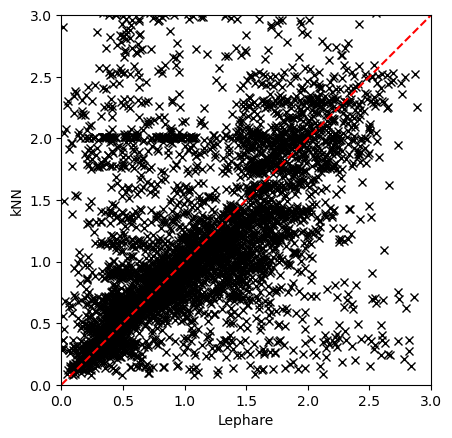
Plotting two estimators#
Plotting, as an example, the results from Lephare and kNN.
[3]:
import matplotlib.pyplot as plt

plt.plot(dp1_pz_df["lephare_z_median"].iloc[::100], dp1_pz_df["knn_z_median"].iloc[::100], "x", color="black")
plt.gca().set_aspect("equal", adjustable="box")
plt.plot([0, 3], [0, 3], color="red", ls="--")
plt.xlim([0, 3])
plt.ylim([0, 3])
plt.xlabel("Lephare")
plt.ylabel("kNN")
[3]:
Text(0, 0.5, 'kNN')
3. Reconstructing a QP Ensemble#
Here we demonstrate how to reconstruct a dictionary of qp.Ensemble objects from the HATS catalog.
Based on the column suffix (e.g., interp, mixmod, norm, hist, or quantile lengths like 99, 20, 5), we parse the nested data fields and rebuild each ensemble using the appropriate qp generator.
[4]:
import qp
import numpy as np


def hats_to_qp(df):
    """Reconstruct `qp.Ensemble` objects from a partition."""
    ensembles = {}

    def extract(nf, subcol):
        return np.asarray([i[subcol] for i in nf])

    for col in df.nested_columns:
        nf = df[col]
        data_dict = {}
        ens_type = col.split("_")[-1]

        match ens_type:
            case "interp":
                data_dict["yvals"] = extract(nf, "yvals")
                data_dict["xvals"] = np.asarray(nf.iloc[-1]["xvals"])
                gen_class = qp.interp_gen
            case "mixmod":
                data_dict["means"] = extract(nf, "means")
                data_dict["stds"] = extract(nf, "stds")
                data_dict["weights"] = extract(nf, "weights")
                gen_class = qp.mixmod_gen
            case "norm":
                data_dict["loc"] = extract(nf, "loc")
                data_dict["scale"] = extract(nf, "scale")
                ensembles[col] = qp.Ensemble(qp.stats.norm, data=data_dict)
                gen_class = qp.stats.norm
            case "hist":
                data_dict["pdfs"] = extract(nf, "pdfs")
                data_dict["bins"] = np.linspace(0, 3, 301)
                gen_class = qp.hist_gen
            case "99" | "20" | "5":
                data_dict["locs"] = extract(nf, "locs")
                data_dict["quants"] = np.asarray(nf.iloc[-1]["quants"])
                gen_class = qp.quant_gen
            case _:
                continue

        ensembles[col] = qp.Ensemble(gen_class, data=data_dict)

    return ensembles
Notice that computing the qp.Ensemble is very computationally expensive. For demonstration purposes we only used a handful of objects.
[5]:
hats_to_qp(dp1_pz_catalog.head())
[5]:
{'bpz_ens_interp': Ensemble(the_class=interp,shape=(5, 301)),
 'cmnn_ens_norm': Ensemble(the_class=norm,shape=(5, 1)),
 'dnf_ens_interp': Ensemble(the_class=interp,shape=(5, 301)),
 'fzboost_ens_interp': Ensemble(the_class=interp,shape=(5, 301)),
 'knn_ens_mixmod': Ensemble(the_class=mixmod,shape=(5, 10)),
 'lephare_ens_interp': Ensemble(the_class=interp,shape=(5, 301)),
 'tpz_ens_interp': Ensemble(the_class=interp,shape=(5, 301)),
 'gpz_ens_norm': Ensemble(the_class=norm,shape=(5, 1))}
About#
Authors: Sandro Campos, Sarah Pelesky, Tianqing Zhang
Last run: Jan 29, 2026
If you use lsdb for published research, please cite following instructions.